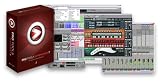
 The M-Audio Pro Tools M-Powered 7.1 World Class Production Software puts the industry standard in audio/MIDI production on the fast track, letting you enter the exciting world of Pro Tools on your own terms. There is no "lite" version here -- Pro Tools M-Powered has the same user interface as Pro Tools and Pro Tools LE, all while expanding your creative hardware options to nearly 20 M-Audio interfaces (requires a supported M-Audio hardware interface to function properly). Session compatibility with all current versions of Pro Tools software means you can seamlessly move your projects between pro, project, and mobile personal studios. Pro Tools M-Powered 7.1 is the serious music production choice for power, compatibility, options and ease of use, without spending "serious" money.
This software is not a watered-down version of Pro Tools. It is Pro Tools. There are actually three flavors of Pro Tools, all of which basically share the same user interface and file format. The primary distinction has to do with hardware -- Pro Tools HD 7 runs on Elite Tools HD hardware; Pro Tools LE 7 works with Digidesign's Mbox, Mbox 2, Digi 002, and Digi 002 Rack; and Pro Tools M-Powered delivers even more options via compatibility with nearly 20 affordable M-Audio interfaces. There is no excuse for not having this industry-standard Digital Audio Workstation (DAW) in your creative toolbox.
Produce with the Industry Standard -- Anytime, Anywhere
The combination of M-Audio gear and Pro Tools M-Powered 7.1 lets you work anywhere, anytime with the industry standard in music production software. This tool seamlessly collaborates with any system running a current version of Pro Tools, including across platforms (Windows XP and Mac OS X). Take your projects to just about any recording studio to have it mixed by a professional, or take your pro studio projects home or on the road. With Pro Tools M-Powered 7.1, owners of most M-Audio interfaces instantly become members of the largest community of digital audio workstation users in the world.
Professional Recording, Editing and Mixing
With up to 32 simultaneous tracks of 16- or 24-bit digital audio, and support for up to 96kHz sample rates, Pro Tools M-Powered 7.1 is an ideal companion for M-Audio interfaces and audio interface keyboards. Once you've finished your recording, you can fine-tune your performances with Pro Tools' unmatched, nondestructive editing tools -- you can shape sounds, compose parts, add effects with the RTAS instrument and effect plug-ins, and create polished mixes with professional mixing features and full mixer automation. Quantizing MIDI data is one thing -- but did you know that Pro Tools M-Powered also enables you to quantize audio? With Beat Detective LE, you can automatically analyze and tighten your rhythm tracks. You can even create groove templates from other loops or songs and apply them to your own material. With this software, you've got the tools you need to create professional mixes.
Advanced MIDI Sequencing
Pro Tools M-Powered 7.1 features a fully integrated MIDI sequencer that allows you to record, edit, and mix up to 256 MIDI tracks alongside your audio tracks. New dedicated instrument tracks combine the audio and MIDI elements of a given virtual instrument into a single channel strip to streamline your workspace. Launch your favorite instrument plug-in to get just the sound you desire, or you can engage loop recordings to quickly develop a multi-layered drum pattern -- no matter what you do you'll be impressed with the software's functionality. Turn on real-time MIDI processing to quantize your performance as it goes down, and use new advanced editing features to easily tweak everything to perfection.
Plug-ins, Plug-ins, Plug-ins
Not only will you have access to award-winning software when you get the Pro Tools M-Powered 7.1, but you'll also instantly be able to take advantage of a variety of RTAS and AudioSuite plug-ins designed by the recording industry's largest professional third-party developer community. For example, you can track with powerful host-based vintage instruments like GForce's Oddity and Minimonsta:Melohman, or add spice with Wizoo's Latigo and Darbuka virtual percussionists. You can even polish your mixes with affordable effects and mastering plug-ins, such as iZotope Ozone and Spectron, that surpass even the most expensive hardware. Pro Tools M-Powered 7.1 also includes more than 43 DigiRack and Bomb Factory plug-ins right out of the box, including EQ, dynamics, delay, reverb, and much more. You also get Digidesign's exciting virtual synth powerhouse and Xpand! with over 1,000 factory patches (up to four parts, four built-in arpeggiators, and two effects processor). The bottom line is that this software is expandable, powerful, and inspiring, and it will help you make your music sound just like you expect it to.
You know how panicky you can get when your computer crashes. Before mine crashed a message flashed across the screen stating Illegal Operation Error. Now what do I make of that? I moved my computer to the room with the air condition in it, hoping that that would cool things off. But yes, like you would have guessed, it crashed again. I called my friend who is good at these things. He observed that I might have a problem with the Registry on my computer and that it would be good for me to check the internet for information. He asked me to check out a software program called Regcure.
I did a little research on the Internet and found out that when the registry files get corrupt they slow down the system, throw up errors and can also crash the computer completely. The cure was to put these registry files in place. I understood from the articles on the internet that this is done using a Registry Repair Software, like Regcure. The pessimistic in me got the better of me, for I checked for negative reviews on Regcure first. Most articles spoke favorably about Regcure. However, in some areas, like in Registry backup, Regcure offered only one method while another software, Max Registry Cleaner offered three; Live Help offered advanced support features and scan log analysis, while Regcure did not. Some features on Regcure though were unique to it. I decided to give it a try. Regcure offers a free trial using which I ran a scan on my computer. There were a whole lot of errors, about 700 plus.
The reviews on the internet were good, so I purchased the software and installed it on my system. It just took me about 5 minutes to figure out how it works. Regcure first scanned the system for errors. It next used the Regcure Automatic Repair feature. It fixed all those errors that were identified. Another thing, every time Regcure runs, a backup of the registry is created on the computer. This ensures that if you ever inadvertently remove some item from the registry, you can always restore it from the backup. Then there's something called the Startup Management feature. I tried that too. I did not know that having many startup items on the computer can impede its performance - and I had quite a few of them. With the help of the Startup Management feature on Regcure, I disabled quite a lot of the startup programs. Now my computer boots up like it is newly out of the box. Regcure is compatible across any Windows Operating System. It comes with standard Registry Repair Software features like registry optimization, options for scheduled scanning, backup and restore and Custom scanning options. I must say here that Regcure has performed quite well, and has lived up to what it promises. It is easy to learn how to use it, and easy to use it too.
I also wondered why my anti-virus software did not do any of these Registry Repairs. I did a little more research on the internet and found out that many of these problems are caused by spyware and AdWare. You can't actually treat spyware and AdWare as harmful, although they do nibble away at your computer's resources. They are also a cause of concern when it comes to maintaining privacy. It is because of this not-so-subtle, but still obscure difference that anti-virus companies have not really gone after spyware and AdWare. This is the reason why a spyware removal tool is necessary even though you have installed anti-virus software on your computer.
Check out my comprehensive Registry Cleaner Reviews to find out which is the Best Registry Cleaner that will boost speed by 110%!
discount software computer
No comments:
Post a Comment